A restaurant needs a separate wired drop for every fixed device: each POS terminal, receipt and kitchen printer, kitchen display screen (KDS), ceiling Wi-Fi access point, kiosk and drive-thru base station. All of them should run back to one rack in the back office. Most failures come from cable that was chained between stations, left unprotected near the cook line, or never labeled. This guide covers what restaurant network cabling in Dallas needs at each station, how to protect it in the kitchen, and what to ask before you hire someone.
Which devices need a wired drop, and where
POS vendors are specific about this. Toast’s site readiness guide says most of its devices need Ethernet, including standalone receipt and kitchen printers, KDS screens, ceiling access points and kiosks. Only a few devices, mainly handhelds and some card readers, are set up to use Wi-Fi. The same guide asks for one Cat5e or Cat6 cable per device location, and terminal drops should end in an RJ45 jack wired to T568B.
Here is a typical drop map. Your POS vendor’s own checklist comes first.
| Location | Device | Wired drop | Power needed nearby |
| Front counter | POS terminal, receipt printer | One per device, plus a spare | Yes |
| Bar | POS terminal, printer | One per device, plus a spare | Yes |
| Expo and cook line | KDS screens, kitchen printers | One per screen or printer | Yes |
| Ceiling, dining and kitchen | Wi-Fi access points | One per access point | No, usually powered over the cable (PoE) |
| Lobby | Kiosks, digital menu boards | One per unit | Yes |
| Drive-thru window | Headset base station, timer controller | One per device | Yes |
| Back office | Manager PC, phones, camera recorder | One per device | Yes |
Two details from Toast’s guide cause trouble on install day if nobody planned for them. The router, each terminal and each printer need a standard outlet within about six feet, and terminals should not share an outlet with a microwave, refrigerator, blender or other motorized appliance. KDS screens also need a wall mount that the restaurant installs before the POS technician arrives. Toast says its technicians do not install mounts.
For the full room-by-room planning process, including how to count drops before the floor plan is locked, see our retail structured cabling guide. Counter-level detail, such as how many drops each register needs, is in our article on POS cabling for DFW stores.
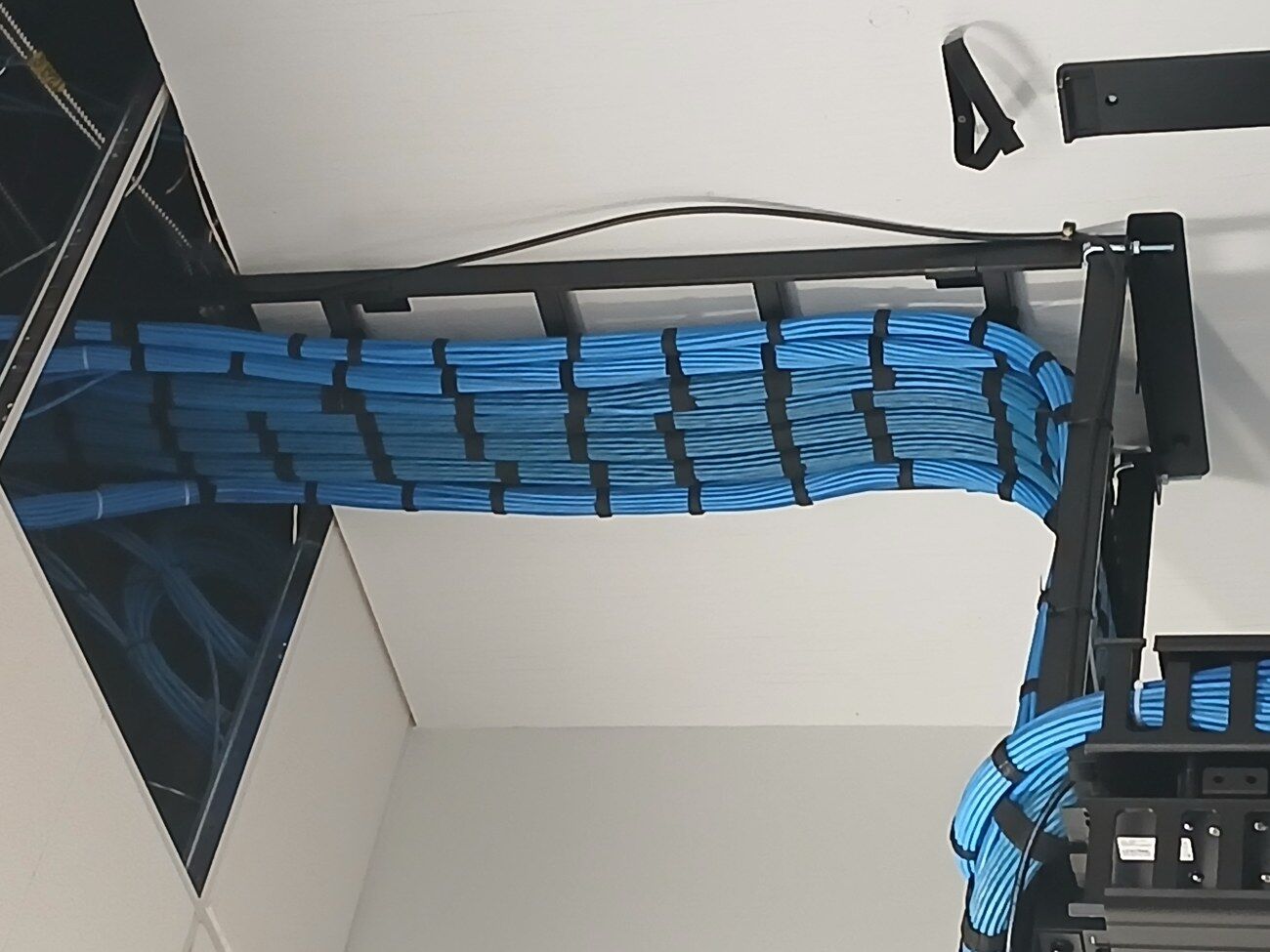
Home runs, not daisy chains
Every drop should run directly back to the network rack. Toast’s guide defines a home run as one cable from a device location back to where the modem is. So a printer at the bar should not be fed from a switch in the kitchen. The bar and the kitchen should each have their own runs back to the rack.
Chaining stations through a small switch under a counter seems cheaper. Then that switch gets unplugged during a deep clean, and the whole kitchen loses its tickets. With home runs, one bad cable takes down one device, and you can find it from the rack.
Toast also asks for 6 to 10 feet of slack at each end and a matching label on both ends of every cable. That slack is what lets you move a KDS a few feet when the line is rearranged, without pulling a new cable.
Kitchen conditions: heat, grease and cleaning
A commercial kitchen is hard on cable. The main risks:
- Heat. The air above fryers, grills and ovens is much hotter than the rest of the ceiling. Route cable around the cook line, not over it, and keep everything away from the exhaust hood. Hoods and their ducts are governed by NFPA 96 and inspected by the fire marshal. Network cable has no business near them.
- Grease. Grease vapor settles on everything above the line, including cable bundles in an open ceiling. Coated cable gets sticky, collects dust and is hard to trace or re-use later. Keep runs in the ceiling outside the cooking area where possible, and drop down to each screen inside conduit or surface raceway.
- Cleaning. Kitchens are washed down, and floors are mopped every night. Never leave cable on the floor or along the base of a wall. Bring drops down from above, end them in a box mounted well above the counter, and keep jacks pointed down or covered so spray does not sit in them.
- Impact. Carts, racks and bus tubs hit walls. Cable dropping to a KDS at the expo station should be in conduit or rigid raceway, not stapled to drywall.
Walk-in coolers and freezers add another problem. In our cold storage cabling case study at Cloud Kitchens sites in Dallas and Farmers Branch, a camera in a 0°F freezer had no cable run at all. The temperature swings every time the door opens. That stiffens standard cable jacket and defeats quick clips and adhesive mounts. The fix was a new cable run with materials and mounting chosen for those swings, and every termination was tested on site before the job was closed.
The back-office rack
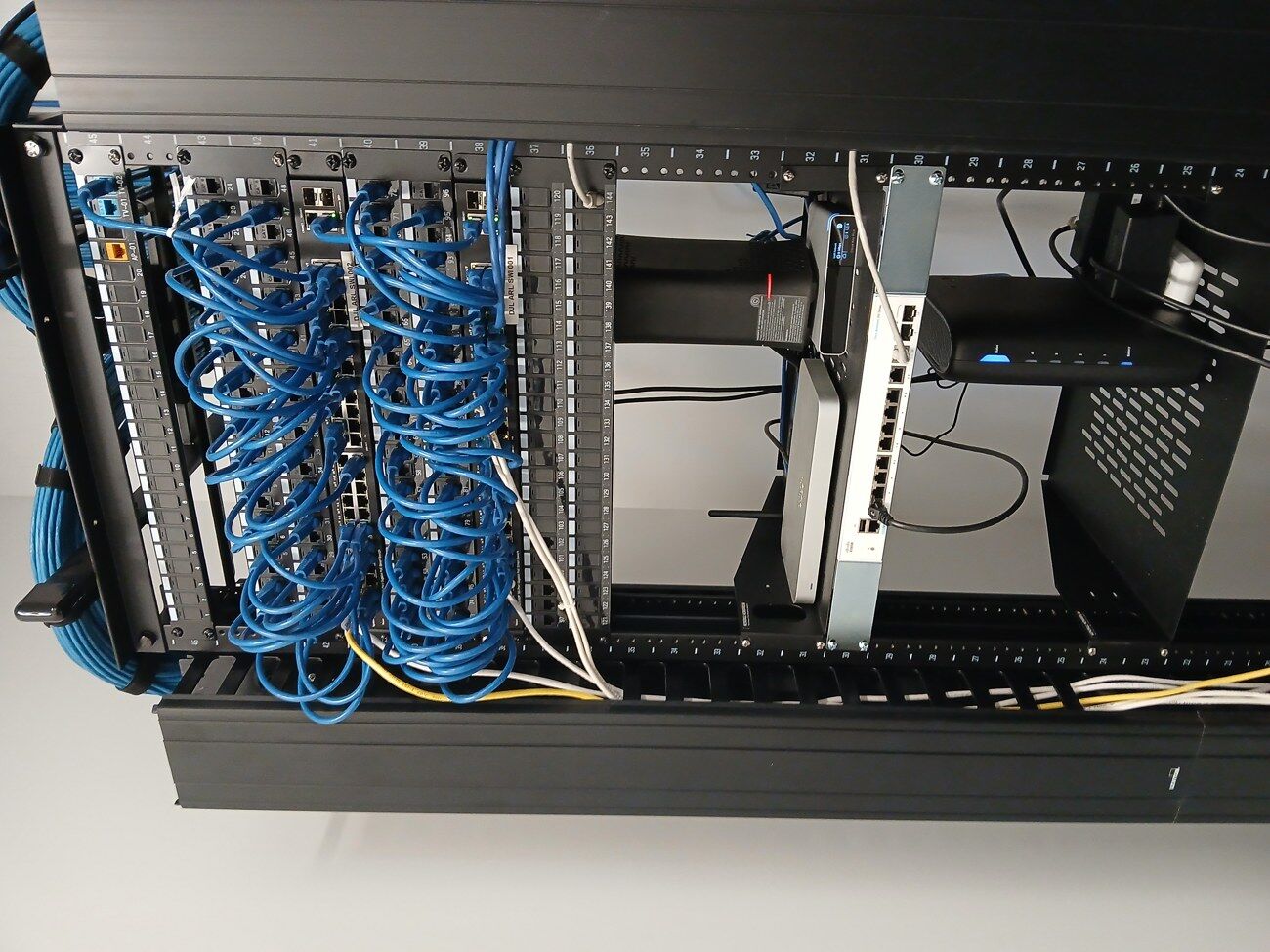
Everything ends in one place, usually the manager’s office or a storage closet. A small wall-mount rack is enough for most single restaurants. Plan room for:
- A patch panel where every drop lands, labeled to match the jack at the device.
- The POS vendor’s router and switch. Toast, for example, ships its own network gear and wants it isolated from other systems.
- The restaurant’s own switch for office PCs, cameras, phones and guest Wi-Fi, with Power over Ethernet (PoE) ports for the access points.
- A battery backup (UPS) so a short power blip does not reboot the POS network during service.
- The internet modem, plus a backup internet connection if you use one.
Pick a spot that stays dry and does not get hot. Back offices often share space with water heaters, ice machines or the mop sink. None of those belong next to the rack. Label the panel and the jacks using a consistent scheme, such as the one in TIA-606, so anyone can trace a port later.
Drive-thru equipment
The drive-thru is its own small network, and much of it is outdoors.
The headset base station is the center of it. HME’s NEXEO installation guide says to mount the base station about 5 feet high, close to a power outlet and the network router, where every crew member can reach it. The base station needs an internet connection to work. HME’s network requirements list a physical port on the restaurant network with at least 10 Mbps. HME’s drive-thru timer controller needs its own network port too.
Out in the lane, cable runs to the order-point speaker post, the menu board and the vehicle detectors. HME’s guide lists Cat5 or Cat6 for its remote transceivers and gives a 500-foot maximum for those runs and for its speaker/mic cables. It also warns against reusing the old wires when replacing an older system. The new system needs new cable routing.
What usually goes wrong at the drive-thru:
- Underground runs without a plan. Cable to the order point and menu board goes underground in conduit. If the conduit is not placed before paving, adding it later means cutting concrete. Underground conduit stays wet, so cable in it should be rated for wet locations.
- No spare conduit. Digital menu boards, cameras and lane sensors get added over the years. An empty spare conduit to each point is much cheaper during site work than later.
- Cable entering the building low. Penetrations near grade let water in. Seal every wall entry.
- Shield wiring left loose. HME’s guide says shielded cable must have its shield terminated to ground and insulated or sleeved.
Staff and guest Wi-Fi
Handhelds, tablets and manager devices run on Wi-Fi, so access point placement matters. Put access points in the ceiling on wired drops, with coverage at the patio, the drive-thru window and any spot where servers take payment.
Keep guest Wi-Fi off the POS network. Toast’s network requirements call for the POS on its own physical network or its own VLAN, with non-Toast devices kept off it. It also asks for at least one physical port on that VLAN for each POS device, labeled for POS use only. The cabling side of this is simple. Run enough drops, and label which ones belong to the POS so nobody plugs a guest router into them later.
Restaurant network cabling in Dallas: code and permits
The City of Dallas adopted the 2023 National Electrical Code (NFPA 70) with local amendments. Per the city’s notice to contractors on the 2023 NEC, it took effect May 23, 2025. Other DFW cities set their own adoption dates and amendments, so check with the city where each location sits.
In practice, three code points come up most in restaurants:
- Cable in a ceiling space used for return air must be plenum-rated.
- Fire-rated walls and ceilings must be sealed again with an approved firestop wherever cable passes through.
- Old cable that is no longer used generally has to be removed if it is accessible, not left in the ceiling.
For the cabling itself, TIA-568 sets the 90-meter limit for a standard horizontal run, and TIA-569 covers pathways. Most single restaurants fit easily inside that limit. Large venues and drive-thru lanes at the back of a big lot are where it gets close.
Keeping several locations the same
For a restaurant group, the cheapest network is the one that looks the same at every store. Write it down once:
- A standard drop map per store type, with device names and jack numbers.
- One labeling scheme, used at both ends of every cable.
- One rack layout, so a manager can talk a technician through it by phone.
- Test results for every cable, filed by location.
When a port goes down at store 12, your IT team should be able to open the drawing, name the jack and know where it lands. That matters most when sites are spread out. In the Cloud Kitchens work, dead Ethernet ports across multiple sites were not one common problem. Each needed its own test and was traced to its own point of failure.
Questions to ask a cabling contractor
- Will every device get its own home run to the rack, with no chained switches?
- How will you route cable around the cook line and the hood, and what goes in conduit?
- How will you protect drops at KDS screens and printers from washdown and impact?
- Have you read our POS vendor’s site requirements and drive-thru equipment install guide?
- What cable rating will you use in the ceiling, outdoors and in the walk-in?
- Will you test every cable and give us the results, labeled to match the jacks?
- Can you place conduit for the drive-thru before paving, with spares?
- Will the labeling and drawings be the same format at every location?
If you are planning a new store or fixing an existing one, our commercial cabling services cover structured cabling, Ethernet, fiber, low-voltage and conduit work across DFW.
Planning restaurant network cabling in Dallas?
Put the cabling in the scope before the first POS terminal is installed, not after the kitchen opens. Talk with Cabling in DFW about your project, and get the details written down from day one: which devices get a home run, how cable is protected in the kitchen and what test results you get at closeout.
Restaurant Cabling in DFW: POS, Kitchen Display Screens and Drive-Thru Networks
Harrison Thornburg
Project Manager — Cabling in DFW (an Ighty Support Company)
A restaurant needs a separate wired drop for every fixed device: each POS terminal, receipt and kitchen printer, kitchen display screen (KDS), ceiling Wi-Fi access point, kiosk and drive-thru base station. All of them should run back to one rack in the back office. Most failures come from cable that was chained between stations, left unprotected near the cook line, or never labeled. This guide covers what restaurant network cabling in Dallas needs at each station, how to protect it in the kitchen, and what to ask before you hire someone.
Table of Contents
Which devices need a wired drop, and where
POS vendors are specific about this. Toast’s site readiness guide says most of its devices need Ethernet, including standalone receipt and kitchen printers, KDS screens, ceiling access points and kiosks. Only a few devices, mainly handhelds and some card readers, are set up to use Wi-Fi. The same guide asks for one Cat5e or Cat6 cable per device location, and terminal drops should end in an RJ45 jack wired to T568B.
Here is a typical drop map. Your POS vendor’s own checklist comes first.
Two details from Toast’s guide cause trouble on install day if nobody planned for them. The router, each terminal and each printer need a standard outlet within about six feet, and terminals should not share an outlet with a microwave, refrigerator, blender or other motorized appliance. KDS screens also need a wall mount that the restaurant installs before the POS technician arrives. Toast says its technicians do not install mounts.
For the full room-by-room planning process, including how to count drops before the floor plan is locked, see our retail structured cabling guide. Counter-level detail, such as how many drops each register needs, is in our article on POS cabling for DFW stores.
Home runs, not daisy chains
Every drop should run directly back to the network rack. Toast’s guide defines a home run as one cable from a device location back to where the modem is. So a printer at the bar should not be fed from a switch in the kitchen. The bar and the kitchen should each have their own runs back to the rack.
Chaining stations through a small switch under a counter seems cheaper. Then that switch gets unplugged during a deep clean, and the whole kitchen loses its tickets. With home runs, one bad cable takes down one device, and you can find it from the rack.
Toast also asks for 6 to 10 feet of slack at each end and a matching label on both ends of every cable. That slack is what lets you move a KDS a few feet when the line is rearranged, without pulling a new cable.
Kitchen conditions: heat, grease and cleaning
A commercial kitchen is hard on cable. The main risks:
Walk-in coolers and freezers add another problem. In our cold storage cabling case study at Cloud Kitchens sites in Dallas and Farmers Branch, a camera in a 0°F freezer had no cable run at all. The temperature swings every time the door opens. That stiffens standard cable jacket and defeats quick clips and adhesive mounts. The fix was a new cable run with materials and mounting chosen for those swings, and every termination was tested on site before the job was closed.
The back-office rack
Everything ends in one place, usually the manager’s office or a storage closet. A small wall-mount rack is enough for most single restaurants. Plan room for:
Pick a spot that stays dry and does not get hot. Back offices often share space with water heaters, ice machines or the mop sink. None of those belong next to the rack. Label the panel and the jacks using a consistent scheme, such as the one in TIA-606, so anyone can trace a port later.
Drive-thru equipment
The drive-thru is its own small network, and much of it is outdoors.
The headset base station is the center of it. HME’s NEXEO installation guide says to mount the base station about 5 feet high, close to a power outlet and the network router, where every crew member can reach it. The base station needs an internet connection to work. HME’s network requirements list a physical port on the restaurant network with at least 10 Mbps. HME’s drive-thru timer controller needs its own network port too.
Out in the lane, cable runs to the order-point speaker post, the menu board and the vehicle detectors. HME’s guide lists Cat5 or Cat6 for its remote transceivers and gives a 500-foot maximum for those runs and for its speaker/mic cables. It also warns against reusing the old wires when replacing an older system. The new system needs new cable routing.
What usually goes wrong at the drive-thru:
Staff and guest Wi-Fi
Handhelds, tablets and manager devices run on Wi-Fi, so access point placement matters. Put access points in the ceiling on wired drops, with coverage at the patio, the drive-thru window and any spot where servers take payment.
Keep guest Wi-Fi off the POS network. Toast’s network requirements call for the POS on its own physical network or its own VLAN, with non-Toast devices kept off it. It also asks for at least one physical port on that VLAN for each POS device, labeled for POS use only. The cabling side of this is simple. Run enough drops, and label which ones belong to the POS so nobody plugs a guest router into them later.
Restaurant network cabling in Dallas: code and permits
The City of Dallas adopted the 2023 National Electrical Code (NFPA 70) with local amendments. Per the city’s notice to contractors on the 2023 NEC, it took effect May 23, 2025. Other DFW cities set their own adoption dates and amendments, so check with the city where each location sits.
In practice, three code points come up most in restaurants:
For the cabling itself, TIA-568 sets the 90-meter limit for a standard horizontal run, and TIA-569 covers pathways. Most single restaurants fit easily inside that limit. Large venues and drive-thru lanes at the back of a big lot are where it gets close.
Keeping several locations the same
For a restaurant group, the cheapest network is the one that looks the same at every store. Write it down once:
When a port goes down at store 12, your IT team should be able to open the drawing, name the jack and know where it lands. That matters most when sites are spread out. In the Cloud Kitchens work, dead Ethernet ports across multiple sites were not one common problem. Each needed its own test and was traced to its own point of failure.
Questions to ask a cabling contractor
If you are planning a new store or fixing an existing one, our commercial cabling services cover structured cabling, Ethernet, fiber, low-voltage and conduit work across DFW.
Planning restaurant network cabling in Dallas?
Put the cabling in the scope before the first POS terminal is installed, not after the kitchen opens. Talk with Cabling in DFW about your project, and get the details written down from day one: which devices get a home run, how cable is protected in the kitchen and what test results you get at closeout.
Frequently Asked Questions
Some can, but POS vendors generally want them wired. Toast’s troubleshooting guidance says stationary devices like terminals and KDS screens should use Ethernet because it is more stable than Wi-Fi and is not affected by wireless interference.
Toast accepts either and will not complete an install on anything below Cat5e. Cat6 is a common choice for new restaurant work. Ask your contractor which category fits your devices and run lengths.
Cable goes in during construction, before ceilings close. POS hardware should go in after. Toast does not recommend installing its hardware during active construction because dust can damage it.
Search Here
Most Recent Posts
Category
Planing a Fiber Project in DFW?
Tell us what you need. Request a project quote.
Our mission is to provide re
Useful Links
Our Services
Contact Us
1509 W Hebron Parkway, Suite Number 150, Carrollton, TX 75010
(469) 478-2121
info@cablingindfw.com
Copyright © 2026 Cabling in DFW | All Rights Reserved | Designed and Maintained by DFW Website SEO